Thermal Master P3 Live Radiometric Camera Stream
Hover or tap the thermal viewport to inspect live per-pixel temperatures.
Camera Presets & Palette Controls
Public Viewer Lock is enabled by default so public viewers cannot alter camera calibration mid-experiment. Operators can unlock with their token to switch between 1. Visualize (Live °C) and 2. Raw Signal (14-bit NUC).
Live Temperature Trajectory (°C)
Cursor: hover videoReal-time rolling history of scene \(T_{\max}\) (amber), \(T_{\text{center}}\) (navy), \(T_{\min}\) (teal), and \(T_{\text{cursor}}\) (emerald green, under current cursor) from the P3 radiometric stream.
Two Radiometric Operating Modes
All camera settings reduce to two core presets (protocol & register reference):
- 1. Visualize (
name=visualize): Best for live human viewing & °C readouts. Uses calibrated1/64 KLUT (nuct_bypass=0), hardware denoising (TNR=50, SNR=50), and periodic shutter calibration (auto_ffc=1). - 2. Collect Raw Signal (
name=raw): Best for offline Python lock-in & millikelvin experiments. Bypasses theNUC-TLUT (nuct_bypass=1) to output un-halved 14-bit NUC counts (-38.62 mK/step, 1.62× finer quantum) with all smoothing and shutter clicks disabled (TNR=0, SNR=0, auto_ffc=0). Visual streams automatically invert polarity so hot stays bright.
Camera & Stream Telemetry
| Thermal Hardware | Thermal Master P3 (0x3474:0x45A2 · 256×192 VOx) |
| Active Operating Preset | visualize (1/64 K LUT · Live °C) |
| Signal Step / Formula | \(T(^\circ\text{C}) = \text{raw}/64.0 - 273.15\) (\(62.5\text{ mK LUT}\)) |
| Gain & Auto-FFC State | High Gain · Auto-FFC ON |
| App Build & Battery | — |
| Security & Privacy Lock | Public Lock ON · RGB Locked OFF |
| End-to-End Stream Lag | — |
Command & Event Audit Log
Full unredacted log:./deploy-phone.sh --logs or GET /api/logs
Every command issued or attempted across HTTP (/api/control, /api/upgrade), Spacesheep control (thermal/p3-control), and browser button events (/-/events) is persistently recorded in Device-Protected storage (command_audit.jsonl).
Waiting for telemetry command audit log…
Physical Hardware Setup
Thermal Master P3 mounted on a flexible arm and connected via USB-C hub to the broadcaster Android phone, streaming the open-bench test rig.
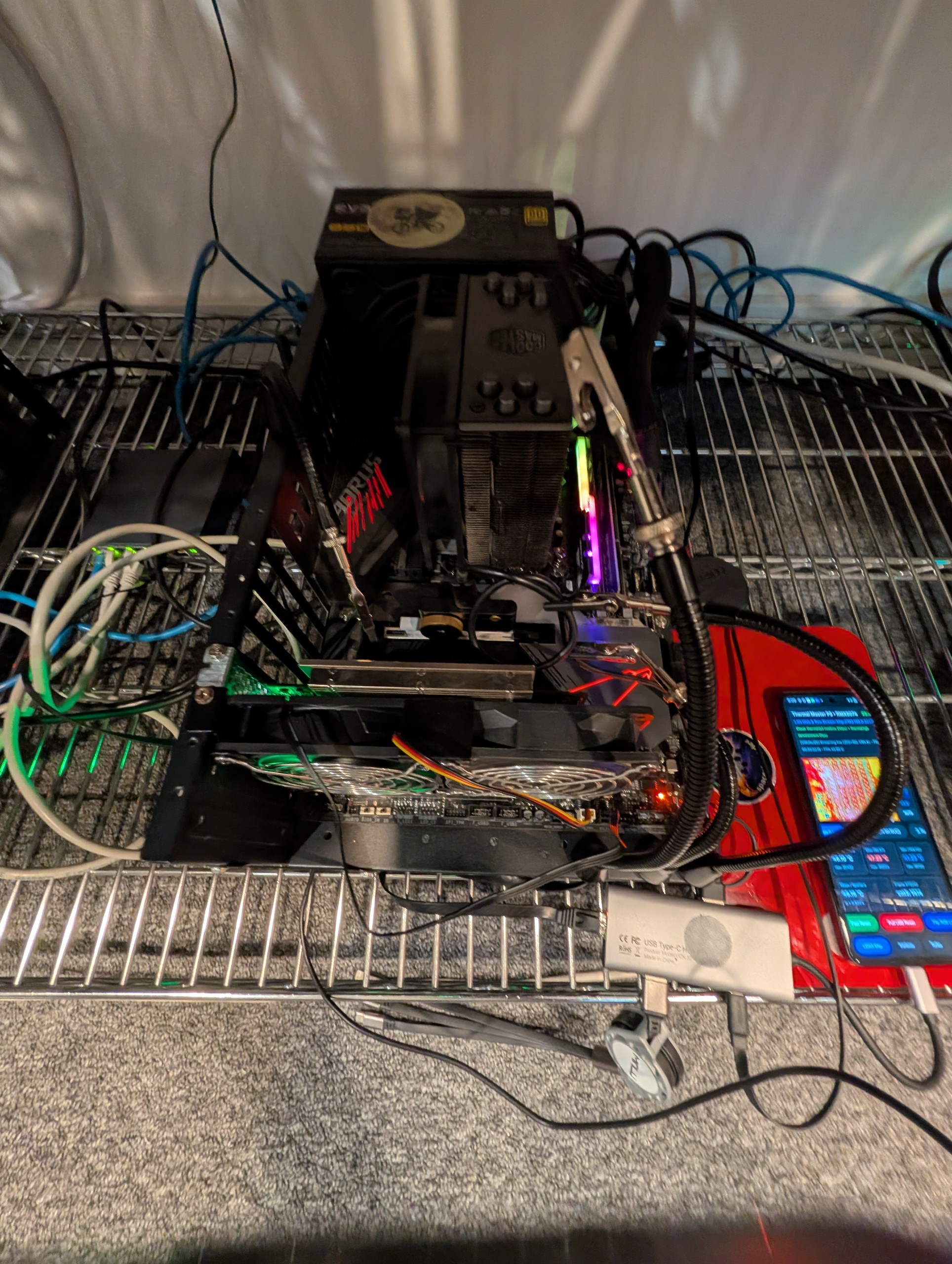
command_audit.jsonl), and AES-256-GCM telemetry encryption are enabled by default so public viewers receive live thermal video and scene temperatures with zero exposure of internal network addresses, optical cameras, or host controls (hardware & protocol reference).